
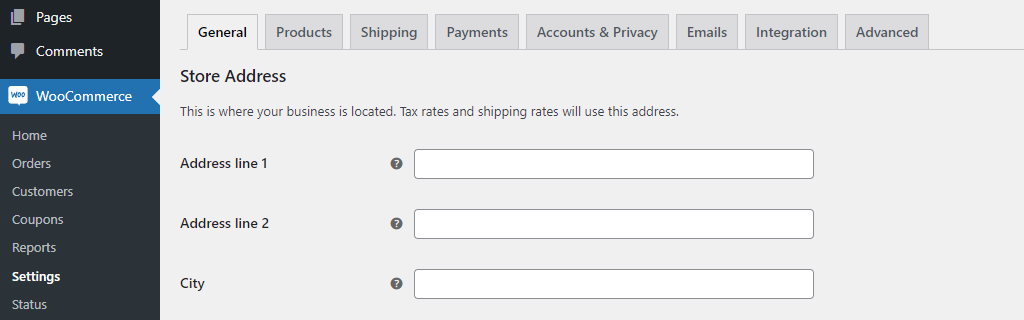
Custom settings
Adding custom settings:
/**
 * Adds settings to "WooCommerce > Settings > Products > Inventory".
 *
 * `apply_filters( 'woocommerce_get_settings_' . $this->id, $settings, $section_id )`
 *
 * To use the option: `get_option( 'wpcodebook_date', '' )`
 *
 * @see https://wpcodebook.com/woocommerce-settings/
 */
add_filter( 'woocommerce_get_settings_products', function ( $settings, $section_id ) {

	if ( 'inventory' !== $section_id ) {
		return $settings;
	}

	return array_merge( $settings, array(
		array(
			'title'    => __( 'WPCodebook options' ),
			'type'     => 'title',
			'id'       => 'wpcodebook_options',
		),
		array(
			'title'    => __( 'Date' ),
			'id'       => 'wpcodebook_date',
			'default'  => '',
			'type'     => 'date',
		),
		array(
			'type'     => 'sectionend',
			'id'       => 'wpcodebook_options',
		),
	) );

}, 10, 2 );
Filters for standard WooCommerce settings pages/tabs:
| General | woocommerce_get_settings_general |
| Products | woocommerce_get_settings_products |
| Tax | woocommerce_get_settings_tax |
| Shipping | woocommerce_get_settings_shipping |
| Payments | woocommerce_get_settings_checkout |
| Accounts & Privacy | woocommerce_get_settings_account |
| Emails | woocommerce_get_settings_email |
| Integration | woocommerce_get_settings_integration |
| Advanced | woocommerce_get_settings_advanced |
Custom settings page
Adding your own settings page/tab:
/**
 * `apply_filters( 'woocommerce_get_settings_pages', $settings )`
 *
 * To add settings: `add_filter( 'woocommerce_get_settings_wpcodebook', function ( $settings, $section_id ) { ... }, 10, 2 )`
 */
add_filter( 'woocommerce_get_settings_pages', function ( $settings ) {
	$settings[] = new class extends WC_Settings_Page {
		function __construct() {
			$this->id    = 'wpcodebook';
			$this->label = esc_html__( 'WPCodebook' );
			parent::__construct();
		}
	};
	return $settings;
} );
Custom settings section
Adding your own settings section:
/**
 * `apply_filters( 'woocommerce_get_sections_' . $this->id, $sections )`
 */
add_filter( 'woocommerce_get_sections_wpcodebook', function ( $sections ) {
	$sections['example'] = esc_html__( 'Example' );
	return $sections;
} );
Settings types
WooCommerce accepts these settings types:
title | Section title |
info | Info |
sectionend | Section end |
text | Standard text inputs and subtypes like ‘number’ |
password | |
datetime | |
datetime-local | |
date | |
month | |
time | |
week | |
number | |
email | |
url | |
tel | |
color | Color picker |
textarea | Textarea |
select | Select boxes |
multiselect | |
radio | Radio inputs |
checkbox | Checkbox input |
image_width | Image width settings |
single_select_page | Single page selects |
single_select_page_with_search | |
single_select_country | Single country select |
multi_select_countries | Country multi-selects |
relative_date_selector | Days/months/years selector |
Custom settings type
Adding custom settings type:
/**
 * Adds custom `price` WooCommerce settings type.
 *
 * `do_action( 'woocommerce_admin_field_' . $value['type'], $value )`
 *
 * Usage example:
 *
 * `array(
 * 	'title'    => __( 'Price' ),
 * 	'id'       => 'wpcodebook_price',
 * 	'default'  => 0,
 * 	'type'     => 'price',
 * )`
 *
 * @see https://github.com/woocommerce/woocommerce/blob/7.9.0/plugins/woocommerce/includes/admin/class-wc-admin-settings.php#L207
 */
add_action( 'woocommerce_admin_field_price', function ( $value ) {

	// Custom attributes
	$custom_attributes = array();
	if ( ! empty( $value['custom_attributes'] ) && is_array( $value['custom_attributes'] ) ) {
		foreach ( $value['custom_attributes'] as $attribute => $attribute_value ) {
			$custom_attributes[] = esc_attr( $attribute ) . '="' . esc_attr( $attribute_value ) . '"';
		}
	}

	// Description
	$field_description = WC_Admin_Settings::get_field_description( $value );
	$description       = $field_description['description'];
	$tooltip_html      = $field_description['tooltip_html'];

	// Title
	$title = sprintf( '%s (%s)', esc_html( $value['title'] ), get_woocommerce_currency_symbol() );

	// Step
	$step = 1 / pow( 10, wc_get_price_decimals() );

	// Output
	?>
	<tr valign="top">
		<th scope="row" class="titledesc">
			<label for="<?php echo esc_attr( $value['id'] ); ?>"><?php echo $title; ?> <?php echo $tooltip_html; // WPCS: XSS ok. ?></label>
		</th>
		<td class="forminp forminp-<?php echo esc_attr( sanitize_title( $value['type'] ) ); ?>">
			<input
				name="<?php echo esc_attr( $value['field_name'] ); ?>"
				id="<?php echo esc_attr( $value['id'] ); ?>"
				type="number"
				step="<?php echo $step; // WPCS: XSS ok. ?>"
				min="0"
				style="<?php echo esc_attr( $value['css'] ); ?>"
				value="<?php echo esc_attr( $value['value'] ); ?>"
				class="<?php echo esc_attr( $value['class'] ); ?>"
				placeholder="<?php echo esc_attr( $value['placeholder'] ); ?>"
				<?php echo implode( ' ', $custom_attributes ); // WPCS: XSS ok. ?>
				/><?php echo esc_html( $value['suffix'] ); ?> <?php echo $description; // WPCS: XSS ok. ?>
		</td>
	</tr>
	<?php

} );
Sanitizing
For example, sanitize text as textarea:
/**
 * Sanitizes `wpcodebook_text` option (`text` type) the same as `textarea` type is sanitized in WooCommerce.
 *
 * Default sanitization for the custom settings types: `wc_clean( $raw_value )`.
 *
 * @see https://github.com/woocommerce/woocommerce/blob/7.9.0/plugins/woocommerce/includes/admin/class-wc-admin-settings.php#L888
 */
add_filter( 'woocommerce_admin_settings_sanitize_option', function ( $value, $option, $raw_value ) {
	return ( 'wpcodebook_text' === $option['id'] ? wp_kses_post( trim( $raw_value ) ) : $value );
}, 10, 3 );